Skip to main content
How to Add and View Digital Assets in a Web3 Wallet?
App Version
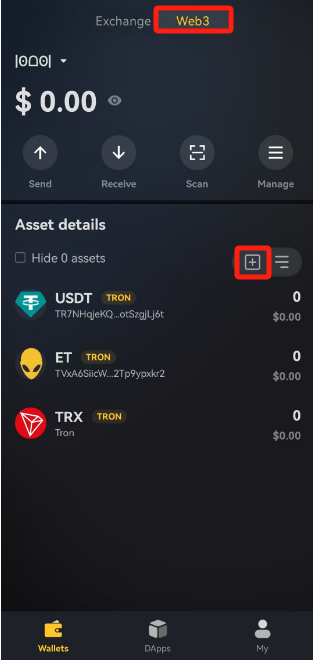
- Open the app and go to 【Web3 Wallet】 -【+】.
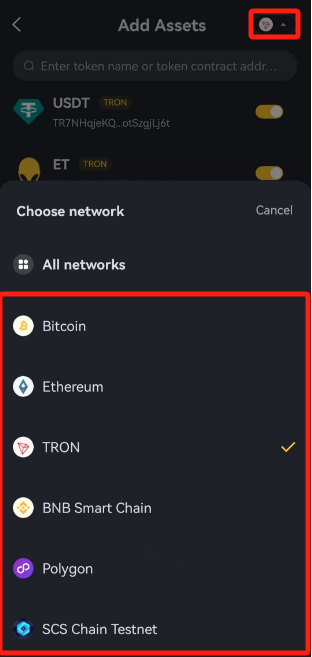
- Click the icon in the top right corner to access the network selection interface, then select 【Network】.
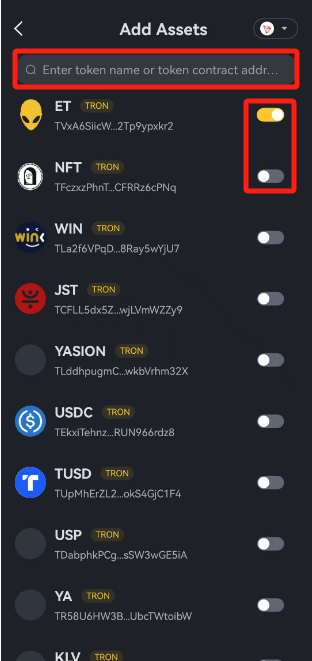
- Search for 【Token Name】 or 【Contract Address】, then add the corresponding token by clicking the button:
- Yellow: Token added
- Gray: Token not added
Friendly Reminders
- BRC20 tokens do not have contract addresses; simply search by token name.
- If you cannot find a specific token, it might be due to:
- The wallet not supporting this token yet.
- You are using a non-private key wallet, which does not support certain tokens (e.g., SOL network).